
Introduction
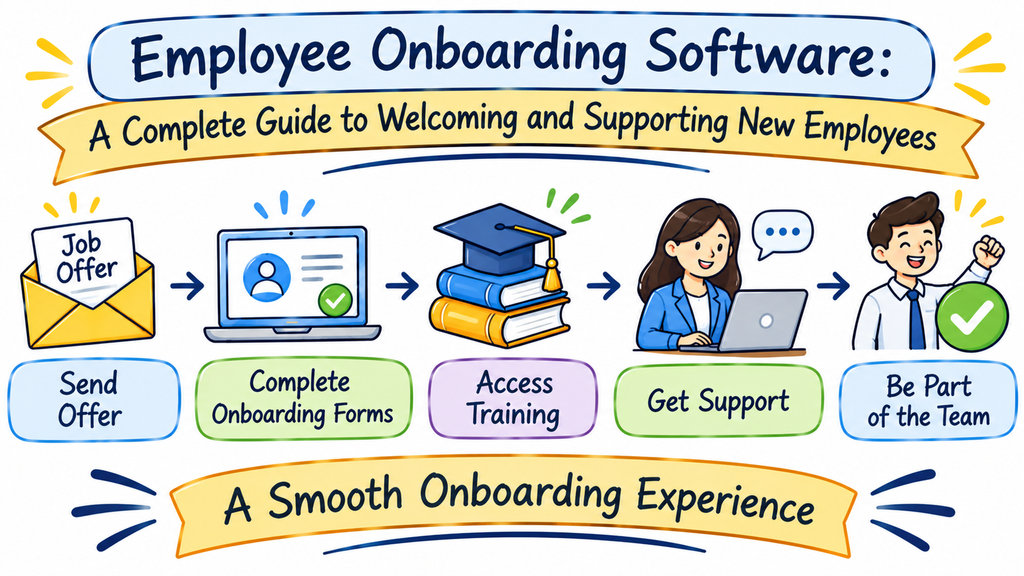
A new employee’s first few months matter. They need clear guidance, the right tools, and regular feedback. HR teams must manage these needs along with daily tasks. Managers also need to prepare training and review work. A scattered process can lead to missed forms and late updates. Employee Onboarding Software helps teams manage these steps in one organized place. It supports new hires from offer acceptance through probation and confirmation. With a clear process, everyone knows what to do and when to do it.
Start by Understanding What New Employees Need
Every new hire wants to understand the job and feel ready to begin. They need basic company details, role expectations, and access to work tools. They also need someone who can answer questions.
HR teams should plan the employee experience around these needs:
- Clear offer details before joining.
- Simple instructions for joining tasks.
- Access to required equipment and systems.
- A useful welcome and orientation plan.
- Role-based training and early goals.
- Regular conversations with the manager.
- Clear feedback during probation.
- A documented confirmation decision.
These steps create a more organized start. They also help managers and HR share responsibility. The process should remain simple enough for every new employee to follow.
Plan the Journey from Offer to Confirmation
A clear timeline helps HR manage each stage. It also gives managers enough time to prepare. Teams can adjust the timeline for different roles and joining needs.
| Stage | Activities | Responsible person or team | Expected outcome |
|---|---|---|---|
| Offer acceptance | Share offer and record the response | HR | Confirmed offer details |
| Preboarding | Collect documents and prepare joining tasks | HR and new hire | Joining preparation complete |
| First day | Welcome, orientation, and team introduction | HR and manager | Employee understands the start |
| First 30 days | Explain duties and set early goals | Manager | Clear role expectations |
| Days 31–60 | Review tasks and discuss progress | Manager and employee | Useful feedback |
| Days 61–90 | Review goals and probation progress | HR and manager | Clear next steps |
Set realistic deadlines for each activity. Give every task an owner. Review the timeline when company policies or job needs change.
Keep Offer Details Accurate and Easy to Find
The offer stage needs careful attention. HR must share accurate terms and record the candidate’s response. Candidates may also request changes before they accept. Teams should keep these updates organized.
Offer Letter Management Software helps HR manage offer documents and revisions. It also supports candidate acceptance records. HR can use these records to check the final agreed details.
Before sending an offer, review:
- Candidate’s full name.
- Job title and department.
- Reporting manager.
- Joining date.
- Pay and agreed benefits.
- Work location and work type.
- Acceptance steps and deadline.
Check the final version before sharing it. Keep approved records secure and easy to access for authorized users.
Use Preboarding to Prepare Everyone
The period before joining gives teams time to get ready. New employees can complete required forms. HR can share instructions and answer questions. Managers can plan training. IT can arrange equipment and system access.
Employee Preboarding Software helps organize these early activities. HR can assign tasks and track completion. New hires can submit details and upload documents. Other teams can follow their own setup duties.
A practical preboarding plan can include:
- Welcome message and joining instructions.
- Required personal information.
- Document upload requests.
- Equipment and workspace preparation.
- Approved system access.
- First-day schedule.
- Manager and team contact details.
- Initial learning plan.
Explain each task in simple words. Give employees enough time to complete requests. Collect only necessary information and protect personal documents.
Give Every Task a Clear Owner
Onboarding involves more than the HR team. IT may prepare equipment. Managers may set goals. New hires may complete forms and training tasks. Each person needs to know their responsibilities.
Onboarding Workflow Automation helps teams organize these activities. HR can assign tasks and set due dates. The system can send reminders and share progress updates. Teams can also see which tasks remain open.
For example, HR can assign document tasks to the employee. IT can handle equipment setup. The manager can prepare the first-month goals. Each person can follow their assigned work.
Automation helps manage routine tasks. People must still review documents, answer questions, and make decisions. Keep personal support at the center of the process.
Build a Checklist for Each Role
Different jobs need different onboarding steps. A developer may need access to technical tools. A sales employee may need product training. A finance employee may need guidance on internal processes.
A New Hire Onboarding Checklist helps teams organize these role-based tasks. HR can create reusable templates. Managers can add activities for specific job needs.
| Task | When to complete | Owner | Why it matters |
|---|---|---|---|
| Review offer documents | Before joining | HR and employee | Confirm agreed terms |
| Complete joining forms | Before joining | New hire | Submit required details |
| Prepare equipment | Before joining | IT | Make work tools ready |
| Set up system access | Before or on day one | IT | Support daily work |
| Conduct orientation | First day | HR | Explain company basics |
| Explain role duties | First week | Manager | Set expectations |
| Set early goals | First month | Manager | Guide employee progress |
| Hold check-ins | First 90 days | Manager | Discuss learning and work |
| Review probation | Before probation ends | HR and manager | Assess progress |
| Store confirmation record | After approval | HR | Keep the final decision |
Keep checklist items short and specific. Assign one owner and a deadline to each item. Review templates when teams change their processes.
Make Joining Tasks Easy to Complete
New hires should not have to search through many emails. They need a simple place to find instructions and finish assigned work.
An Employee Onboarding Portal can support this need. Employees can review offers, submit personal details, and upload documents. They can also check pending tasks from their phones.
A portal can help new hires:
- Review offer details.
- Submit joining information.
- Upload required documents.
- View pending activities.
- Follow joining instructions.
- Complete assigned tasks.
HR teams can track submissions through the process. Set access permissions based on each person’s role. Only authorized users should view private employee information.
Guide Learning with a 30 60 90 Day Plan
New employees need time to learn their duties. Managers should set clear goals and provide regular guidance. A simple plan can help everyone understand the next milestone.
A 30 60 90 Day Onboarding Plan breaks early learning into three stages.
First 30 days: Learn the work
- Understand company rules and processes.
- Meet the manager and team.
- Learn key job duties.
- Review required tools and systems.
- Discuss questions and early challenges.
Days 31–60: Apply new skills
- Start handling regular tasks.
- Use skills from training.
- Review agreed goals.
- Discuss work challenges.
- Ask for feedback and support.
Days 61–90: Review progress
- Take ownership of agreed tasks.
- Check progress against goals.
- Discuss strengths and learning needs.
- Set future development goals.
- Prepare for probation review.
Managers should adjust the plan to fit each role. Some employees may need more time for training. Regular discussions help managers provide the right support.
Make Probation Reviews Part of Regular Work
Probation should include more than one final meeting. Employees need regular feedback during this period. Managers should discuss progress and areas for improvement.
Employee Probation Management Software helps HR track review dates and records. Managers can document check-ins and feedback. HR can follow deadlines and pending decisions.
A useful probation review should cover:
- Work quality and accuracy.
- Understanding of job duties.
- Communication with colleagues.
- Progress against agreed goals.
- Learning and training needs.
- Ability to manage regular tasks.
- Support needed for improvement.
Use clear examples during reviews. Give employees a chance to share their views. Keep feedback fair and linked to role expectations.
Prepare the Confirmation Letter After Review
Employee confirmation should follow a proper review and approval. HR and managers should check progress against agreed goals. They should also follow the employment agreement and company policy.
An Employee Confirmation Letter Generator workflow can help HR prepare the final document. Teams can use approved templates and review the details before sending the letter.
Check these details:
- Employee name and job title.
- Confirmation date.
- Relevant employment details.
- Approved terms or changes.
- Required authorization.
- Final document record.
Software can help prepare the letter. It cannot replace HR judgment or legal review. Employment rules vary across locations and agreements.
Avoid These Common Onboarding Mistakes
Small gaps can create extra work and confusion. HR teams should watch for common problems and address them early.
- Late joining instructions: Share the joining plan before the start date.
- Incorrect offer details: Review the final offer before sending it.
- Missing documents: Set clear upload tasks and deadlines.
- Unprepared equipment: Give IT enough time to prepare tools.
- Unclear task ownership: Assign each task to a person or team.
- Scattered communication: Use a shared place for joining activities.
- Weak role guidance: Ask managers to explain duties and goals.
- Missed check-ins: Schedule regular meetings in advance.
- Late probation reviews: Track deadlines and pending feedback.
- Poor record security: Limit access to approved users.
Review these issues after each hiring cycle. Update checklists and templates when teams find better ways to work.
Simple Habits That Improve Onboarding
Technology helps organize the process, but daily habits matter too. HR and managers should work together from the start. They should also make it easy for employees to ask questions.
- Prepare role-based templates.
- Share joining details early.
- Use clear and simple instructions.
- Set realistic task deadlines.
- Involve managers from day one.
- Give employees a contact for help.
- Hold regular one-to-one meetings.
- Record important feedback.
- Review open tasks each week.
- Protect employee data.
These habits help teams create a steady process. They also give new hires a better understanding of their work.
How DayOneFlow Supports HR and Managers
DayOneFlow helps teams organize the employee journey from offer to confirmation. HR can manage offer details, preboarding, and joining tasks. Teams can use checklists, task assignments, reminders, and workflow updates.
The platform supports an employee portal for offer reviews, personal details, document uploads, and assigned tasks. HR and managers can track check-ins and probation reviews. Teams can also prepare confirmation letters with approved templates.
DayOneFlow includes dashboards, reusable templates, reporting, role-based access, and audit trails. These tools help teams manage work and review records. Visit dayoneflow.com to explore the platform.
Examples of Onboarding in Real Work Settings
Each role brings its own needs. A clear process can support different employees with suitable changes.
Example 1: A new sales employee
HR shares the offer and joining forms. The manager prepares product training and sales goals. The employee follows a role-based checklist. Regular meetings help the manager review early progress.
Example 2: A remote technology employee
HR shares joining instructions through the portal. IT prepares the device and approved system access. The manager sets early learning goals. Regular team calls help the employee understand work practices.
Example 3: A finance team employee
HR collects the required documents. The manager explains daily tasks and review steps. IT arranges approved system access. Regular check-ins help the employee learn internal processes.
Example 4: An employee nearing confirmation
The manager reviews goals and shares feedback. HR checks the review records and approval. After the decision, HR prepares the confirmation letter. The team stores the final document with the employee record.
Frequently Asked Questions
1. What is employee onboarding software?
Employee Onboarding Software helps companies manage tasks for new hires. It can organize offers, joining forms, checklists, reminders, and reviews. HR teams can track work across departments. Managers can follow their responsibilities. Some platforms also support probation and employee confirmation.
2. How does new hire onboarding software help HR teams?
New Hire Onboarding Software gives HR teams a shared process for new employees. HR can assign tasks and set deadlines. Managers can guide employees and review progress. New hires can complete their own activities. This helps everyone understand their responsibilities.
3. What does employee preboarding software include?
Employee Preboarding Software helps teams prepare new hires before their first day. HR can collect required details and documents. Managers can plan training. IT can prepare equipment and access. These steps help employees complete important tasks before joining.
4. Can onboarding workflow automation reduce manual follow-ups?
Onboarding Workflow Automation can manage task assignments, reminders, deadlines, and updates. HR can track pending activities without asking every person for a separate update. Managers and employees can also see their tasks. People must still review documents and provide personal guidance.
5. Why should companies create a new hire onboarding checklist?
A New Hire Onboarding Checklist helps teams track required activities. It can include documents, equipment, system access, orientation, and training. It can also cover check-ins and probation reviews. Each task should have a clear owner and deadline.
6. What is an employee onboarding portal?
An Employee Onboarding Portal gives new hires one place to complete joining tasks. Employees can review offers, submit personal information, upload documents, and check pending work. HR can track submissions. Suitable access rules help protect private employee records.
7. How should companies use a 30 60 90 day onboarding plan?
A 30 60 90 Day Onboarding Plan gives new employees clear goals for their first three months. The first month focuses on learning. The second month focuses on applying skills. The third month reviews progress and future needs. Managers should adjust goals to the role.
8. What does employee probation management software track?
Employee Probation Management Software can help track review dates, manager feedback, deadlines, and decisions. HR can follow pending reviews. Managers can record progress against agreed goals. The platform helps organize records, but people must make fair decisions.
9. How does offer letter management software help during hiring?
Offer Letter Management Software helps HR organize offer documents and revisions. It can also keep candidate acceptance records. This makes the final agreed offer easier to find. HR should review every document before sharing it.
10. What is an employee confirmation letter generator?
An Employee Confirmation Letter Generator workflow helps HR prepare confirmation letters with approved templates. HR can add employee details and review the document. The team should send it only after the required approval and checks.
11. Who should take part in employee onboarding?
HR coordinates the main process and employee records. Managers explain job duties and review progress. IT prepares approved tools and system access. New hires complete assigned tasks and ask questions. Clear task ownership helps everyone work together.
12. Does onboarding software guarantee legal compliance?
No. Software can organize tasks and records, but it cannot guarantee compliance. HR teams must follow local employment rules and the relevant agreement. They should seek legal advice when needed. They must also protect employee information and limit access to approved users.
Final Thoughts
A good onboarding process gives every new hire a clear path. It also helps HR and managers share their work. Start preparation before the joining date. Keep offers and documents organized. Use role-based checklists and clear task owners. Set goals for the first 90 days. Hold regular reviews and share useful feedback. Make probation decisions with care. Store confirmation records securely. The right software can connect these activities in one process. DayOneFlow helps teams manage key steps from offer acceptance to employee confirmation. A clear process makes the start easier for everyone.