
Introduction
Modern businesses depend on fast and reliable IT systems. Their teams manage cloud platforms, applications, networks, and software releases. As these systems grow, daily operations become more complex.
Manual work can slow down important tasks. It can also create errors, delays, and extra costs. NoOps helps organizations reduce this pressure through automation.
NoOps uses cloud services and automated workflows to manage routine IT activities. Teams can automate infrastructure setup, application testing, deployment, monitoring, and recovery.
However, NoOps does not remove the need for engineers. People still design systems, protect data, manage risks, and solve complex problems. Automation simply handles more repeatable work.
A successful NoOps approach needs a clear plan. It also requires suitable tools, strong security, and practical skills. NoOpsSchool offers a dedicated learning and consulting focus around NoOps and modern automation practices.
This guide explores the core ideas, tools, benefits, challenges, and implementation steps behind NoOps.
What Makes NoOps Different?
NoOps focuses on reducing routine operational work through automation. It connects infrastructure, software delivery, and system management.
In a traditional environment, engineers often perform repeated tasks manually. They create servers, update configurations, deploy applications, and check system health.
These tasks can become difficult when an organization manages many applications. Manual processes also make it harder to maintain consistent environments.
NoOps uses automation to handle suitable tasks. Engineers define the required settings and rules. Automation tools then perform approved actions.
For example, a team can define cloud resources through code. A pipeline can build and test an application. Monitoring software can detect a known failure and trigger an approved response.
The key difference lies in how teams manage routine work. NoOps relies more on automation and managed services, while people retain control over important decisions.
Business Reasons to Adopt NoOps
Organizations adopt NoOps to improve how they build and manage technology services. The benefits depend on the quality of their automation and processes.
Reduce Repetitive Work
Engineers often spend time on routine infrastructure and deployment tasks. Automation can handle many of these activities.
This gives teams more time for architecture, security, performance, and improvement.
Improve Delivery Speed
Automated pipelines can build, test, and release applications. They reduce repeated manual steps and support more consistent deployments.
Teams can release changes more often when they maintain strong testing and approval controls.
Improve System Consistency
Manual configuration can create differences between environments. Infrastructure automation helps teams apply the same approved settings.
This reduces configuration errors and makes systems easier to reproduce.
Strengthen Operational Visibility
Monitoring and observability tools collect useful information about system behavior. Teams can identify problems and investigate their causes.
Better visibility supports faster and more informed decisions.
Manage Cloud Resources Better
Automation can help teams identify unused resources and apply scaling policies. It can also support cost reporting and resource governance.
Teams must still review spending and protect important resources.
Support Business Growth
Automated workflows can support more applications and workloads. Teams can expand services without increasing every manual task.
However, automation must grow with proper testing and governance.
The Main Parts of a NoOps Environment
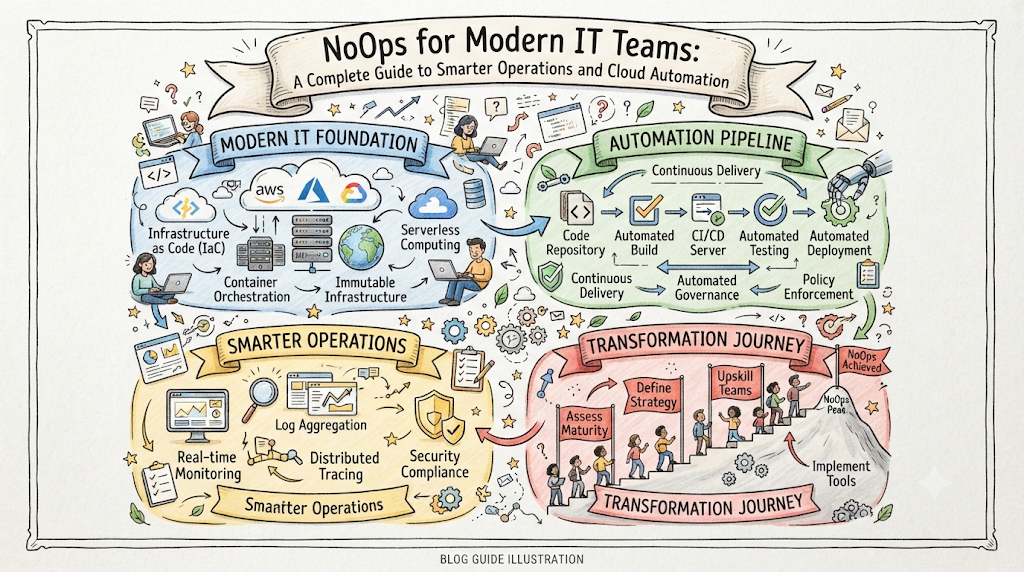
A complete NoOps environment needs several connected technology layers. Each layer supports a different operational requirement.
Cloud Computing Services
Cloud platforms provide computing, storage, databases, networking, and managed application services.
AWS, Microsoft Azure, and Google Cloud offer services that reduce some infrastructure management tasks.
Teams should choose cloud services based on workload needs. They must also review security, pricing, availability, and service limits.
Infrastructure as Code
Infrastructure as Code (IaC) lets teams define infrastructure through code. Engineers can manage servers, networks, storage, and other resources through reusable configurations.
Terraform and AWS CloudFormation support this approach.
Teams can store infrastructure definitions in version control. They can then review changes before applying them.
CI/CD Pipelines
Continuous Integration and Continuous Delivery automate software building, testing, and deployment.
Jenkins, GitHub Actions, and GitLab CI support different pipeline workflows.
A pipeline can run unit tests, scan dependencies, create packages, and deploy approved releases.
Teams should define clear failure conditions. They should also keep release records and rollback options.
Container Technology
Containers package applications with their dependencies. This helps teams run applications consistently across environments.
Docker supports container creation and management. Teams can use container images as part of automated delivery workflows.
Container Orchestration
Kubernetes manages container workloads across clusters. It supports scheduling, service discovery, scaling, and workload management.
However, Kubernetes adds operational complexity. Teams should use it when their workload and architecture justify it.
Configuration Automation
Configuration management helps teams maintain standard system settings.
Ansible and Puppet can automate package installation, service configuration, and other repeatable tasks.
Reusable configurations reduce manual effort. They also help teams maintain consistent environments.
Monitoring and Observability
Monitoring tracks system health through metrics and alerts. Observability helps engineers understand system behavior through metrics, logs, and traces.
Prometheus, Grafana, OpenTelemetry, and Jaeger support different parts of this process.
Teams should focus on useful signals. They should avoid creating alerts that do not lead to clear action.
Security and Policy Automation
Security automation checks applications and infrastructure throughout the delivery process.
Teams can scan code, inspect dependencies, check container images, and validate infrastructure settings.
They can also enforce identity rules and protect sensitive credentials. These controls should apply across the full environment.
Comparing Important NoOps Tools
NoOps does not depend on one product. It uses a group of tools that work together.
| Technology area | Common examples | Main use |
|---|---|---|
| Cloud platforms | AWS, Azure, Google Cloud | Host applications and services |
| Infrastructure as Code | Terraform, CloudFormation | Create and manage resources |
| Configuration management | Ansible, Puppet | Maintain system settings |
| CI/CD | Jenkins, GitHub Actions, GitLab CI | Automate software delivery |
| Containers | Docker | Package applications |
| Orchestration | Kubernetes | Manage container workloads |
| Monitoring | Prometheus, Grafana | Track system health |
| Observability | OpenTelemetry, Jaeger | Investigate application behavior |
| GitOps | Argo CD, Flux | Manage deployments through Git |
| Security scanning | Trivy, SonarQube | Find selected security and code issues |
Tool selection should reflect business needs and technical requirements. Avoid adding tools that duplicate existing functions without clear value.
How NoOps Automation Works
A NoOps workflow connects code changes with application delivery and system monitoring.
A typical NoOps workflow
Code Changes
Developers submit updates through version control
Build and Test
Pipelines build applications and run automated tests
Security Validation
Scan code, dependencies, and application packages
Release Controls
Check policies and required approvals
Automated Deployment
Release the approved application version
Monitoring and Feedback
Track service health and review performance
This process reduces repeated manual steps. It also creates a clear record of each release.
Teams should define what happens when a stage fails. Critical errors should stop the workflow until someone reviews them.
Practical Examples of NoOps in Action
Organizations can use NoOps in many areas. These examples show how automation can solve common operational problems.
Creating Cloud Environments
A development team needs separate environments for testing and application development.
Manual setup takes time. It can also create differences between environments.
The team uses Terraform to define the required infrastructure. A pipeline checks the code and creates approved resources.
Developers receive consistent environments. The team can also remove temporary resources after testing.
Automating Software Releases
A company releases application updates several times each month. Manual release steps slow delivery and create avoidable risks.
The team creates a CI/CD pipeline. It builds the application, runs tests, scans dependencies, and deploys approved changes.
The pipeline stops when a critical test fails. Engineers can investigate the problem before release.
Managing Cloud Resource Usage
A business runs many workloads across cloud environments. Some teams leave test resources running after projects finish.
The business creates resource policies and cost reports. Automation identifies resources that need review.
The team can then approve suitable cleanup actions. This approach reduces waste without risking important systems.
Responding to Known Service Problems
An application sometimes experiences a known service failure. Engineers usually follow the same recovery steps.
The team creates an automated response workflow. It checks the failure condition and performs an approved recovery action.
The system also records the event and alerts the responsible team. Engineers investigate when the problem needs further analysis.
Security Practices for NoOps Environments
Automation can make operations more consistent. However, it can also increase the impact of poor security settings.
Teams must protect every workflow and service.
Apply Least-Privilege Access
Give each user and service only the permissions it needs. Avoid unnecessary administrator access.
Use role-based access controls where suitable. Review permissions regularly and remove outdated access.
Protect Sensitive Information
Pipelines may need passwords, API keys, and tokens. Store these values in secure secrets management systems.
Never place credentials inside source code. Limit access to production secrets and review access rules.
Run Automated Security Checks
Add security scans to software delivery pipelines. Check code, dependencies, container images, and infrastructure configurations.
Define clear rules for critical findings. Stop releases when they break important security policies.
Keep Useful Audit Records
Record important infrastructure changes and deployment activity. Track access events and automated actions.
These records help teams investigate incidents. They also support governance and internal security reviews.
Improving Reliability Through Automation
NoOps can improve reliability when teams design and test workflows carefully. However, automation cannot prevent every failure.
Start by defining service-level objectives. These objectives describe the reliability and performance users expect.
Then choose meaningful monitoring signals. Track error rates, response times, resource usage, and service availability.
Teams should create alerts for important conditions. Each alert needs a clear owner and response plan.
Recovery automation can handle known problems. For example, a workflow may restart a service after a health check confirms a failure.
A reliable recovery plan should include:
- Regular backups with restoration tests.
- Clear recovery time objectives.
- Clear recovery point objectives.
- Tested deployment rollback options.
- Health checks before automatic actions.
- Limits on automatic scaling.
- Alerts for failed recovery attempts.
- Human review for high-risk actions.
Teams should test recovery workflows before production use. They should also repeat tests after major system changes.
Common Challenges During NoOps Adoption
NoOps adoption can become difficult when teams focus only on automation tools. A successful approach also needs good processes and clear ownership.
| Common challenge | Possible result | Practical response |
|---|---|---|
| Automating unclear processes | Existing problems repeat faster | Improve processes before automation |
| Selecting too many tools | Higher maintenance effort | Keep the stack focused |
| Weak access controls | Risky system changes | Apply least-privilege permissions |
| Poor monitoring | Delayed problem detection | Define useful alerts and metrics |
| Uncontrolled cloud resources | Unexpected spending | Set budgets and resource policies |
| Limited team skills | Slow adoption and troubleshooting | Provide practical training |
| Missing documentation | Confusing workflows | Record decisions and ownership |
Teams should review these risks throughout implementation. Regular reviews help keep automation safe and useful.
Measuring NoOps Performance
Organizations need clear metrics to understand whether NoOps delivers value. They should measure results instead of counting automation scripts.
Important measures include:
- Deployment frequency: How often teams release software.
- Lead time for changes: How long code takes to reach production.
- Change failure rate: How often releases cause service problems.
- Mean time to recovery: How quickly teams restore service.
- Automation success rate: How often workflows complete correctly.
- Cloud spending: How much the organization spends on resources.
- Service availability: How reliably users access applications.
- Security findings: How many issues automated checks detect.
Review these measures regularly. Compare them with earlier results and business goals.
Faster releases do not always mean better performance. Teams must also review quality, reliability, and user experience.
Skills Needed for NoOps Engineering
NoOps requires professionals who understand automation and modern IT systems. Teams need skills across several technical areas.
Cloud engineering: Professionals should understand cloud services, networking, storage, and managed infrastructure.
Infrastructure as Code: Engineers should know Terraform, configuration files, reusable modules, and version control.
CI/CD and GitOps: Teams need skills in automated testing, software delivery, and Git-based deployment practices.
Containers and Kubernetes: These skills help professionals package and manage container-based applications.
Security engineering: Engineers need knowledge of identity management, secrets, security scanning, and policy enforcement.
Observability: Professionals should understand metrics, logs, traces, dashboards, and alerting.
Automation design: Teams must build reusable workflows and manage failures safely.
Organizations can develop these skills through training and practical projects. Shared documentation also helps teams maintain consistent practices.
A Step-by-Step NoOps Adoption Plan
A phased plan helps organizations introduce automation without disrupting critical services.
| Phase | Key activities | Expected outcome |
|---|---|---|
| Review | Study existing systems and manual tasks | Clear automation priorities |
| Plan | Set goals, standards, and tool choices | Agreed implementation strategy |
| Prepare | Set up IaC, version control, and access rules | Consistent technical foundation |
| Pilot | Automate one application or process | Tested workflow |
| Expand | Apply proven automation to more services | Wider adoption |
| Improve | Review cost, security, and reliability | Better operational results |
| Govern | Audit workflows and update policies | Long-term control |
Each phase should include testing and documentation. Teams should expand only after they understand the results.
The Future of NoOps
NoOps will continue to develop as cloud services and automation tools improve.
Managed cloud services will handle more routine infrastructure work. This can reduce the effort needed to maintain common technology components.
AI-driven operations may help teams analyze alerts and identify unusual patterns. These systems may also suggest possible responses.
Self-healing systems can respond to known failures through approved workflows. Teams must still test these actions and set strict limits.
GitOps and policy as code will support consistent infrastructure and application changes. Better observability will give teams more insight into complex systems.
The future will bring more automation, but human judgment will remain essential. Engineers will continue to guide architecture, security, governance, and critical decisions.
Frequently Asked Questions
What is NoOps in IT operations?
NoOps uses automation to reduce routine IT management tasks. It can support infrastructure provisioning, software delivery, monitoring, and recovery. Teams define rules for repeatable activities. Engineers still manage architecture, security, governance, and complex technical issues.
How does NoOps improve operational efficiency?
NoOps can reduce manual steps across infrastructure and software delivery. Automated workflows help teams perform repeatable tasks consistently. Monitoring can also help identify problems earlier. Organizations should measure results through delivery speed, reliability, cost, and service quality.
Does NoOps mean there are no IT operations teams?
NoOps does not mean removing IT operations teams. It changes how they manage daily work. Automation handles suitable routine activities, while engineers focus on design, security, reliability, and complex incidents. Human oversight remains important for sensitive decisions.
Which tools are commonly used in NoOps?
Common tools include Terraform, Ansible, Jenkins, GitHub Actions, Docker, Kubernetes, Prometheus, and Grafana. Argo CD and Flux support GitOps workflows. Trivy and SonarQube support selected security and code-quality checks. Teams should choose tools based on their needs.
Is NoOps suitable for small organizations?
Small organizations can adopt NoOps gradually. They can begin with managed cloud services, infrastructure automation, and simple CI/CD pipelines. This can reduce repeated work without requiring a large technology stack. Teams should still review security, costs, and maintenance needs.
What role does Infrastructure as Code play in NoOps?
Infrastructure as Code lets teams define resources through reusable configuration files. Engineers can review and version these definitions before applying changes. This improves consistency across environments and reduces manual setup. It also creates a clearer record of infrastructure changes.
How can NoOps support cloud security?
NoOps can add security checks to automated workflows. Teams can scan code, dependencies, container images, and infrastructure settings. They can also enforce access policies and protect secrets. Audit records help engineers investigate changes and review security events.
Can NoOps automate incident response?
NoOps can automate responses to known and tested conditions. A workflow may restart a service, scale resources, or roll back a failed release. Teams must define safe limits and keep useful logs. Complex incidents still need human investigation.
How should teams measure NoOps success?
Teams should track deployment frequency, lead time, change failure rate, and recovery time. They should also review cloud costs, automation success, and service availability. These measures show whether automation improves operations without creating new risks.
How can professionals prepare for NoOps roles?
Professionals should learn cloud computing, Linux, scripting, Infrastructure as Code, and CI/CD. They should also study containers, Kubernetes, security, and observability. Practical projects help connect these skills. Continuous learning helps engineers manage changing automation practices.
Final Thoughts
NoOps helps organizations manage modern IT systems with less routine manual work. It connects infrastructure, software delivery, security, and monitoring through automation.
But reliable operations need more than automated tools. Teams must define clear rules, test workflows, protect access, and measure results.
Start with simple tasks and expand through proven steps. Keep engineers involved in critical decisions and review automation regularly.