Introduction
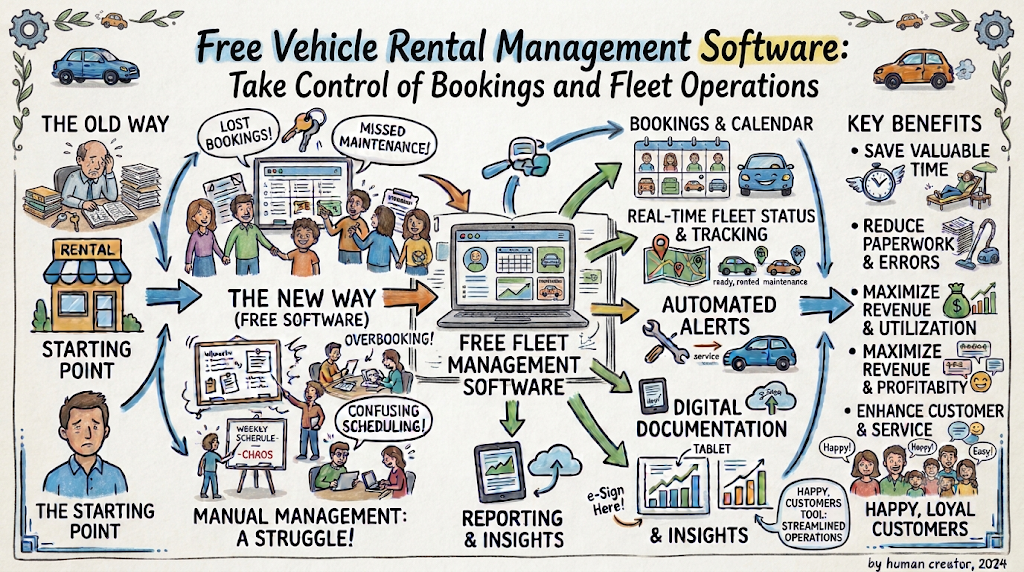
A rental business depends on good planning and accurate records. Owners must manage vehicles, customers, reservations, payments, and repairs. These jobs become harder when the business receives more bookings. Paper registers and separate spreadsheets can slow down daily work. Free vehicle rental management software offers a simple way to organize these activities. It helps owners keep important details together and manage their fleet more clearly. The right platform can also reduce manual tasks. Before choosing one, compare its features, limits, and costs.
Start With a Clear Rental Management Process
Good software works best when your business follows a clear process. First, understand how customers book your vehicles. Then review how staff handle payments and vehicle returns.
Look for tasks that often cause delays:
- Checking vehicle availability.
- Confirming customer reservations.
- Updating booking dates.
- Recording deposits and refunds.
- Tracking vehicle returns.
- Scheduling maintenance.
- Finding previous customer details.
- Preparing monthly business reports.
Choose software that makes these tasks easier. You do not need advanced features if your business only needs basic booking management.
Keep Your Fleet Information in One Place
Every vehicle needs an accurate record. This helps staff check its details before accepting a reservation. It also makes maintenance and availability easier to manage.
| Vehicle record | Details to include |
|---|---|
| Basic information | Model, category, and registration |
| Rental details | Daily price and rental conditions |
| Availability | Available, reserved, or under repair |
| Condition | Inspection notes and visible damage |
| Maintenance | Service dates and repair history |
| Rental activity | Previous bookings and return records |
Update these details after every rental. Mark vehicles unavailable when they need servicing. This reduces confusion during busy periods.
Make Booking Management More Reliable
A vehicle rental booking system helps owners manage reservations and dates. Staff can check existing bookings before confirming a new request. They can also update the calendar when customers change their plans.
Follow a consistent booking routine:
- Receive the customer’s request.
- Check the requested rental dates.
- Confirm vehicle availability.
- Explain the rental price and conditions.
- Record customer details.
- Add deposit information.
- Confirm the reservation.
- Update the vehicle calendar.
- Inspect the vehicle after return.
- Close the booking record.
Check whether the platform supports cancellations, extensions, and booking changes. These options can help staff handle common customer requests.
Select Features for Your Rental Category
A rental company should choose tools that match its vehicles. Car, motorcycle, bike, and scooter businesses may need different workflows.
| Vehicle type | Useful software features |
|---|---|
| Cars | Booking calendar, customer records, payment tracking |
| Motorcycles | Condition reports, service history, rental agreements |
| Bikes | Availability updates, quick reservations, pricing |
| Scooters | Short booking records, customer details, payment status |
Some platforms support several categories. Others focus on one type of rental. Check the available settings before adding your vehicles.
Manage Customer Information Carefully
Customer records help staff handle bookings and repeat requests. Keep contact information connected to the correct reservation. Add rental dates, vehicle details, and agreed terms.
A useful customer record may include:
- Customer contact details.
- Booking reference.
- Selected vehicle.
- Rental period.
- Agreed rental conditions.
- Payment status.
- Previous rental history.
Keep information accurate and relevant. Give staff access only to the records they need. This can help protect customer privacy.
Keep Payments Clear and Updated
Payment tracking helps owners understand which bookings have been paid. It also reduces confusion about deposits and remaining balances.
Record these details for every reservation:
- Total rental price.
- Deposit received.
- Outstanding balance.
- Payment date.
- Refund details.
- Additional charges.
- Final payment status.
Some free vehicle rental management software offers basic payment records. Other providers charge extra for online payment processing. Review these terms before selecting a platform.
Compare Free Software With Paid Plans
A free plan can help new rental businesses manage costs. However, providers may limit vehicles, bookings, staff accounts, or reports.
Compare the main plan details before creating an account.
| What to review | Questions to ask |
|---|---|
| Vehicle limit | How many vehicles can you add? |
| Booking limit | Are monthly reservations restricted? |
| Staff access | How many people can use the system? |
| Reports | Which reports come with the plan? |
| Payment options | Does payment processing cost extra? |
| Data export | Can you download your records? |
| Support | What help can you access? |
| Extra charges | Are setup or transaction fees involved? |
A free plan should support your current workload. Consider paid options only when your business needs more capacity or advanced tools.
Use Business Reports to Plan Ahead
Rental reports can help owners understand business performance. They show which vehicles receive regular bookings. They may also reveal low demand or frequent cancellations.
Review these figures regularly:
- Total confirmed bookings.
- Monthly rental income.
- Cancelled reservations.
- Unpaid balances.
- Vehicle usage.
- Repair expenses.
- Repeat customer activity.
Use these details to make practical decisions. For example, you may review prices for vehicles with low demand. You may also plan repairs for vehicles with frequent service needs.
Keep Vehicles Ready for Customers
Vehicle maintenance should form part of your rental routine. A vehicle that needs repairs should not remain available for booking.
Record service dates and inspection results. Check each vehicle before handing it to a customer. Note existing damage and other visible issues. Inspect the vehicle again after its return.
Keep these maintenance details:
- Inspection date.
- Repair description.
- Service history.
- Mileage or usage details.
- Parts replaced.
- Next service date.
- Current vehicle status.
Accurate maintenance records help owners plan expenses. They also support better fleet decisions.
Understand Vehicle Rental Costs in Europe
Rental prices differ across European locations. The vehicle model, season, rental period, and destination affect the total cost. Insurance, deposits, mileage limits, and extra services may also increase the price.
People searching for motorcycle rental cost Europe should compare the complete rental terms. A daily price may not include every charge.
Rental owners should calculate their own costs as well. Include insurance, maintenance, cleaning, repairs, and platform fees. Clear pricing helps customers understand the amount they need to pay.
Protect Your Business and Customer Data
Rental software may store personal details, booking records, and business documents. Owners should review the provider’s security and privacy practices.
Follow these basic steps:
- Use strong passwords.
- Enable extra login protection when available.
- Give staff access based on their roles.
- Remove access when employees leave.
- Keep regular backups.
- Review account permissions.
- Store customer documents securely.
Businesses that handle personal data in Europe should understand the GDPR rules that apply to them. Check how the provider handles data access, correction, and deletion requests.
Test a Platform Before Using It Daily
A free plan gives you a chance to test the software. Start with sample information. Do not move every business record before checking the main functions.
Test these tasks:
- Add sample vehicles.
- Create a customer profile.
- Enter a test booking.
- Change the reservation dates.
- Record a deposit.
- Update vehicle availability.
- Add a maintenance entry.
- Review the booking history.
- Check business reports.
- Test the mobile version.
Ask staff members to try these tasks. Their feedback can help you find confusing steps. Choose a system that feels easy during normal business hours.
Use Online Marketplaces to Help Customers Find Vehicles
Rental management software and online marketplaces serve different purposes. Management software helps owners organize their internal work. A marketplace helps customers discover vehicles and connect with rental providers.
For example, travelers searching for motorcycle rental Europe may want to compare options in different locations. Owners may also want to rent out my motorcycle or list my car for rent online.
MotoShare Europe connects vehicle owners, rental providers, and customers across Europe. Its marketplace focuses on motorcycles, bikes, scooters, and cars. Customers can explore rental options through motosharego.eu.
A marketplace can help customers discover available vehicles. Owners should still check their needs for booking records, payment tracking, and maintenance management. Review the current services and terms before choosing a platform.
Avoid Common Software Selection Mistakes
The wrong platform can increase daily work. Check the important details before moving your records.
- Do not choose software only because it is free.
- Check the vehicle and booking limits.
- Review setup and transaction charges.
- Confirm support for your vehicle categories.
- Test booking changes and cancellations.
- Check data export options.
- Review privacy and security practices.
- Avoid paying for features you do not need.
- Train staff before using the system.
Choose a platform that solves your current problems. Review your requirements as your rental business grows.
Frequently Asked Questions
What is free vehicle rental management software?
It is a digital system that helps owners manage vehicles, reservations, customers, payments, and maintenance. Free plans may include usage limits.
Can a small rental business use free software?
Yes. Free plans can support basic rental operations. Check vehicle limits, booking capacity, and available features first.
What should free car rental software include?
Look for vehicle records, booking calendars, customer profiles, payment tracking, and rental history. Maintenance tools can also help.
Can bike rental software manage scooters?
Some platforms support both categories. Check whether the software allows separate vehicle types and rental rules.
How can a vehicle rental booking system prevent double bookings?
It helps staff check existing reservations and vehicle availability. Update the calendar whenever a booking changes or receives confirmation.
Does motorcycle rental software track maintenance?
Some platforms offer service records and maintenance reminders. Confirm these features before selecting a provider.
Do free rental software plans include payment processing?
Not always. Some platforms offer payment tracking but charge extra for online transactions. Review the payment terms carefully.
How much does motorcycle rental cost in Europe?
Prices depend on the location, motorcycle model, season, and rental duration. Insurance, deposits, mileage limits, and extra services also affect the total.
Can I rent out my motorcycle through an online marketplace?
Some marketplaces connect motorcycle owners with potential renters. Check listing rules, fees, insurance terms, and rental conditions first.
When should I upgrade to paid rental software?
Consider upgrading when your business needs more vehicles, bookings, staff accounts, reports, or support than the free plan allows.
Final Thoughts
A successful rental business needs clear records and reliable daily processes. Free vehicle rental management software can help owners organize bookings, payments, customers, and fleet details. But every platform offers different features and limits. Compare the plans and test the main functions before making a decision. Choose a system that saves time and supports your business as it grows.